The Warewolf ESB Syntax
The Warewolf Syntax is purely used for referencing data. There are no functions that can be executed using the language. To manipulate and transform the data, we use the system tools and mashups of services and data connectors.
The syntax allows us to use our data as and when it is needed.
Data is held in memory for as long as the service (workflow) is executing.
There are a few rules you need to follow when defining your variables / [[Syntax]] for the Variable List.
- Variables are defined by using [[ and ]] square braces.
- Variables are CaSe SensistiVe. So [[this]] does not equal [[This]].
- Variables cannot have spaces in their names. So [[First Name]] is not allowed.
- Variables are made up of alphanumeric characters as well as dashes (-) and underscores (_).
- Variables must start with an alphabetical character.
- If in the input area your variable is red, then it has not yet been added to the variable list, or it is in an error state. Check that it is not duplicated and that these rules are followed.
- Nested braces are dealt with as they are typed at design time and not as they appear at run time. So [[[[Part]]]] will evaluate twice. [[Part]] (where the value is "[[Piece]]") will evaluate only once.
- Variables are Unique per Service/Variable List.
Scalars
The notation for a Scalar variable is [[VariableName]]. A use case could be [[Firstname]] = Bart and [[Surname]] = SimpsonIf an input for another service required the format “Surname, Firstname” then we would simply input like so “[[Surname]], [[Firstname]]” which would be the equivalent of “Simpson, Bart”
Recordsets
The notation for a Recordset variable is [[Recordset(n).Field]].n refers to the index of the recordset
Recordset or repeating variables can have a number of different uses, namely:
Given we have the following recordset data in the examples below:
[[Family(1).Name]] = Homer [[Family(1).Surname]] = Simpson
[[Family(2).Name]] = Marge [[Family(2).Surname]] = Simpson
[[Family(3).Name]] = Lisa [[Family(3).Surname]] = Simpson
[[Recordset()]] - no Field Name
- As Input: Only ever used when a tool needs to know a Recordset Name to perform work on, like Count Reords Tool or For Each Tool.
- e.g.
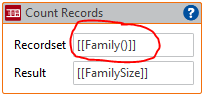
- e.g.
- As Result: Never
[[Recordset(n).Field]] - n Exists
- As Input: Behaves exactly like a Scalar. This notation is used when getting information out of a recordset at a particular index. If n = 3, then the value of the field in row 3 will be used.
- e.g.
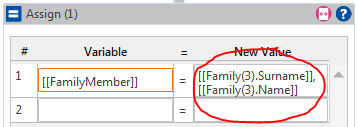 [[FamilyMember]] would now = Simpson, Lisa
- e.g.
- As Result: Behaves exactly like a Scalar. The value of the variable will be overwritten with the new output value.
- e.g.
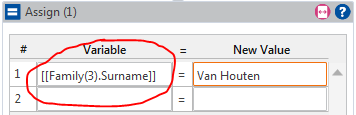
- e.g.
[[Recordset(n).Field]] - n Doesn't Exist
- As Input: An index that does not exist has a Null value, so an error is returned.
- e.g.
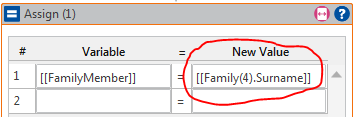 will error at run time if the data is as per above.
- e.g.
- As Result: Specifying an index that does not exist, will append NULL data up to that index and then the Result at that index - effectively creating the index.
[[Recordset().Field]] - no Index
- As Input: Assumes the last index and inserts the value at that index. This is so you don’t have to track the last index.
- e.g.
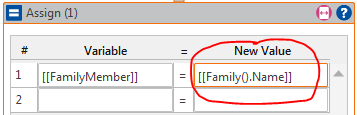 [[FamilyMember]] would now = Lisa.
- e.g.
- As Result: Behaves exactly like a Scalar. Appends one new record to the Recordset from the last index.
- e.g.
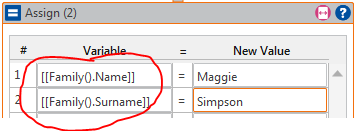 [[Family(4).Name]] would now = Maggie and [[Family(4).Surname]] would now = Simpson.
- e.g.
[[Recordset(*).Field]]
- As Input: Will execute each and every index in the Recordset.
- e.g.
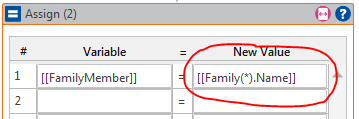 [[FamilyMember]] would now = Lisa (Each record executed so the last record would be the remaining one).
- e.g.
- As Result: For every execution, the result will be written to the Recordset starting at index 1 until there are no more results. If indexes already exist then data at that index will be overwritten.
- e.g.
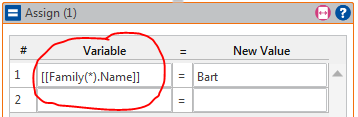 Every Name in the Family recordset will be Bart.
- e.g.
Syntax Summary
| [[Rec (*).Field]] | [[Rec ().Field]] | [[Rec(n).Field]] – n Exists | [[Rec(n).Field]] – n Doesn’t Exist |
| Input All | Last record | Record at index “n” | NULL |
| Output All with overwrite | Append from last | Record at index “n” | Append up to "n" |
Служба підтримки клієнтів працює на UserEcho
