Connecting to Remote Servers
Any Warewolf ESB Server has the ability to connect to any other Warewolf ESB Server.
Provided all the relevant ports on the network and/or firewall are opened correctly, follow the steps below to connect from one server to another.
For this example we will assume that the server you are connecting to is the Warewolf Free Store server.
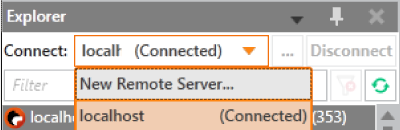
- Create a new connection to a remote Warewolf server by clicking New Remote Server… in the connect drop down menu.
- In the Address field, type http://store.warewolf.io:3142 (Substitute this address for the address you want to connect to).
- Make sure you type in the http:// Also, you can use the relevant IP address in the same manner e.g. http://1.1.1.1:3142
- Select Authentication Type as Public (or relevant credentials) and click Test Connection.
- If you are using the User Authentication Type, remember to add the domain if relevant e.g. MYDOMAIN\username
- Save the connection as you want for future use.
Customer support service by UserEcho
